Save the screen to a free account, download the PDF or request it by email. Keep the income scenarios, location evidence, assumptions and next checks together.
Free with an account
Create a free account to keep your result. No payment is collected here.
03 · DEVELOP
Develop your selected opportunity
Equipment sizing, hourly solar matching, costs, debt and sensitivities turn a selected route into a detailed study. Review layout and connection evidence, operator requirements and the validation plan.
Use the engines available in your plan to compare scenarios, edit assumptions, save results and share supported exports. You provide and review the site evidence; exports depend on the engine and available inputs.
Optional assisted site study
Commission help to develop a selected opportunity under a separate scope and price. Agree the deliverables and required external checks before commissioning; a software subscription does not include this service.
Watch supports recorded deadlines, evidence and assigned actions. External grid, regulatory, market and equipment monitoring requires configured and validated sources. Check coverage and verification status in your workspace; a subscription alone does not activate those sources.
Compare the uses of your solar output.
Spot market
Direct wire
EV charging
Data centre · colocation or GPUs
Pumping & irrigation
Compare cautious, base and upside cases. The two data-centre models have different operating needs. Selling or leasing land is a separate property opportunity.
How is the owner's income calculated?
An external operator funds and operates the additional equipment. Split only the surplus after operating costs, equipment debt, rent, minimum operator return and the owner's spot-income baseline.
Additional income is compared with the same optimized spot-market alternative and includes site rent. Each scenario is conditional, not a quote. Failed cases keep spot income. Existing PV costs and taxes are excluded.
INTERACTIVE EXAMPLE
Explore a sample site decision.
Try layouts, cash flows and evidence checks on a synthetic solar site. These eight teaching examples illustrate the workspace; they are separate from your site's opportunity screen and report.
Move an assumption. The finance engine recalculates the figures and the cash flow for the values you choose; downloads follow the nearest prepared case.
ENGINEERING CHECK
Which module, and what fits on the same tables?
Capacity retained · % of nameplate
Equity view: the engine sizes screening debt to a 1.35× cover target, up to 70% gearing, at 6% over 15 years. A theoretical appendix, not an offer.
Cumulative cash flow · EUR
Illustrative and pre-tax. Not a quotation or a promise of returns.
COMPARE
Pinned cases, side by side
Case
Initial investment
Project NPV
Project IRR
Payback
Minimum DSCR
Land
Energy per year
Independent options on the same site: compare them, never add them.
Review the assumptions
20 years, constant EUR, no tax. Each option is independent; repowering costs are not included in the co-location examples.
Download this sample scenario. For your own site, start with the opportunity report, then use the workspace to assess options and share a saved decision with your team, adviser or bank.
Preview report
Sample downloads are available in English and Italian. They contain illustrative assumptions, not customer data. JSON/CSV retain stable source field names.
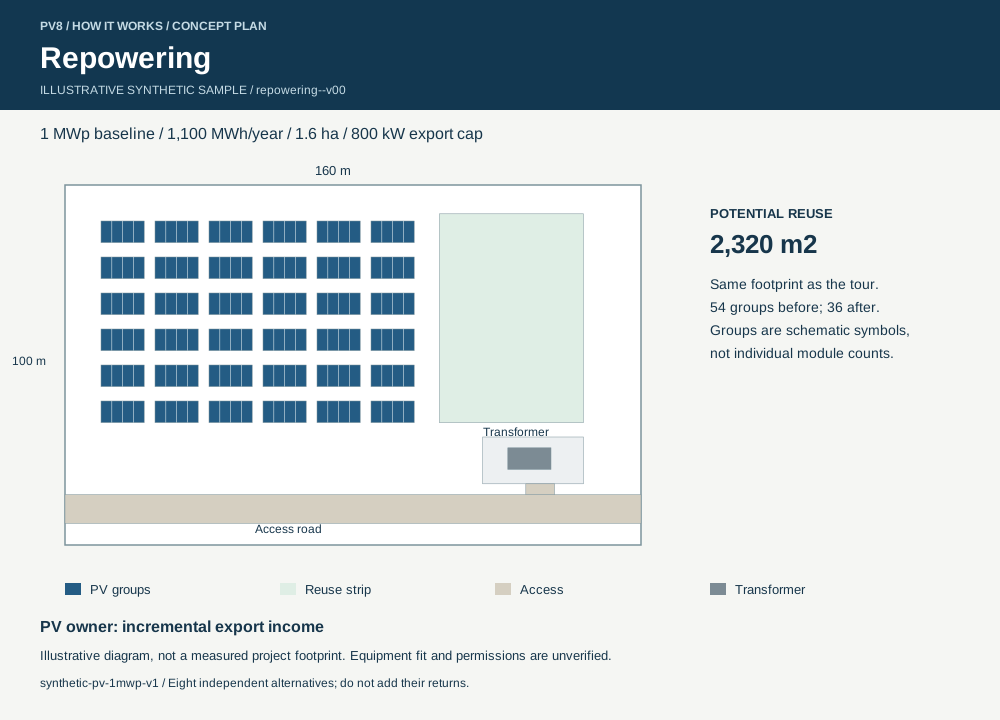
Each example has a prepared layout, economics and downloads. The data-centre, greenhouse and land examples show owner lease income; they do not model the tenant business. Repowering here does not include battery dispatch.
Compare options with your own site evidence, save decision versions, collaborate with reviewers and use PV8 Watch to track the recorded deadlines and actions behind a saved decision.
Explore repowering first: compare the replacement modules, retained capacity, costs and space released. Assess recycling and any additional use separately before combining the decisions.
Can I use my existing engineering files?
Start with your location, then add boundaries, layouts, equipment information and generation records. Keep using your engineering tools; PV8 helps compare opportunities and organise the evidence for a decision.
Is a promising result ready to build or finance?
No. Screening helps prioritise the next investigation. Surveys, connection rights, permits, equipment quotations and customer demand still need confirmation.
Where does AskPV8 help?
Ask about a result, an assumption or the next missing input. Review proposed changes before applying them. The calculation engines, not the chat response, determine the financial result.
Can someone else review my result?
Share a saved result with permitted recipients. Your private asset profile and unrelated work remain separate. You control access and can revoke the link.
Later runs never rewrite that decision record.
Recipients verify their work email to contribute; nothing changes a result until the owner reviews and accepts it.
A PV8 account is required only when the recipient chooses to retain the work in a workspace, expand it into other engines or originate a new asset.
Do I need an account to begin?
Screen a site before registering and create a free account to keep your opportunity report. A detailed site study is scoped and priced separately. Current trial terms and plan limits are shown at sign-up.
See current trial terms →repoweringdata centreEV chargingwindgreenhouseInitial investmentProject NPVYear-one net cash flowDownload report · PDFDownload financial model · XLSXDownload layout · SVGReview the assumptionsPrepared scenarioLoading the sample…The sample could not load. Please retry or screen your own site.Retry sampleScenario updated. Downloads match these assumptions.Confirm contracted grid import, cooling design, fibre service and customer demand.Confirm traffic, customer demand, charging access and contracted grid import.Confirm wind measurements, setbacks, adjacent land rights and grid connection.Confirm crop plan, water, grower demand and the applicable agricultural permissions.Confirm equipment quotes, grid rights and permission to change the plant.Confirm the network operator’s consent, the curtailment allocation and the neighbour’s demand.Confirm the cable route, wayleave, metering design and the off-taker’s demand profile.Confirm the planning status, access, a tenant and the lease terms.shared connectiondirect wireland leaseReplacement PV capacityExport priceAnnual plot rentOwner enabling CAPEXCharging utilisationCharging priceCapacity factorLand leased to growerAnnual land rentHorizonDiscount rateAnnual operating costsCorporate taxInflationTarget DSCR (equity view)Maximum gearing (equity view)Interest rate (equity view)Debt tenor (equity view)Initial investmentProject NPVProject IRRPaybackYear-one net cash flowEquity investedEquity NPVEquity IRRMinimum DSCRGearingyearsbeyond 20 yearsagainst a hurdle ofClears the hurdle rate.Below the hurdle rate.Nearest single change on this grid:gives an NPV ofNo single change on this grid reaches a positive NPV; move both assumptions.Equity cash flow · EURYearDiscounted paybackEquity paybackRevenueOperating costsInvestmentCumulativeCumulative, discountedCumulative equityEquity cash flowDebt servicePrevious caseShared export capacityCapacity feeOutput sold by direct wireDirect-wire priceLand leased outExport limitLeased areaTenant IT capacityChargersCharger powerGrid electricity costFixed operating costsTurbinesTurbine ratingConnection export limitCable lengthYear-one revenueRevenue degradation per yearReplacement yearReplacement costYear-one energyAdded export in year oneDirect-wire volume in year oneCapacity-sharing fee only: the neighbour’s generation is outside the owner’s cash flows.Price uplift over grid export only. This is not the value of the whole plant.Site-owner lease: the tenant pays for and operates its own use of the land.Prepared casecalculated offline by the finance engineCalculating…Livefinance enginecached answerLive calculation unavailablethe nearest prepared case is shownDownloads are prepared for the nearest case:Modules per tableReplacement capacity on the tablesDC/AC ratio at the export capPeak export against the capClipping at the export capExport yieldTables releasedLand releasedtablesper tablemodulesportraitlandscapeno clippingclipping starts aboveExisting modulesNew modulesGeometric fit of each module into the plant’s synthetic tables and a replay of the chosen capacity against the 800 kW export cap. No structural, electrical, shading or permit check.Released space follows the chosen module on the layout; the downloads keep the fixed schematic.12 months of metered generationO&M contract with an availability guaranteeModule warranty with a degradation datasheetFirm module and EPC quotesWith this evidence the 20-year NPV lies betweenandP90 energy, high costP10 energy, low costEnergy uncertaintyP90–P10 bandContractual revenue on this route: only the cost band applies; confirm the counterparty terms instead.Declare evidence on the Evidence step to narrow this range.Pinned.Already pinned.Three cases is the limit; remove one first.RemovelivereleasedIncremental PV output only. This is not the value of the whole plant.Site-owner lease: the tenant pays for and operates the data centre.Owner-operated charging: grid electricity purchases are included.A separate wind investment on adjacent land, not existing PV income.Site-owner lease: the grower pays for and operates the greenhouse.20 yearsExportImportLeaseSale